Torque Pro (OBD 2 & Car)
Ian HawkinsCommunication
4.010.60K Reviews
- Version
- 1.12.108
- Installs
- 1.00M
- Age Rating
- Everyone
Screenshots
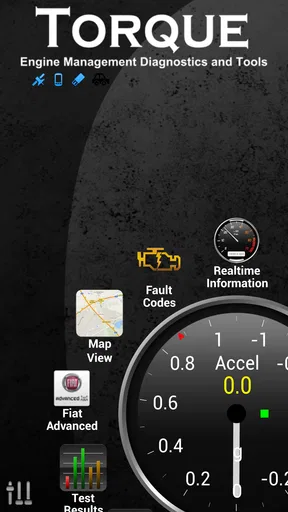
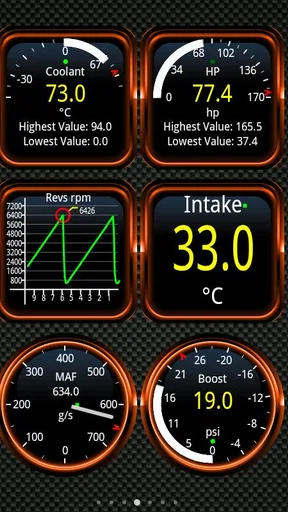
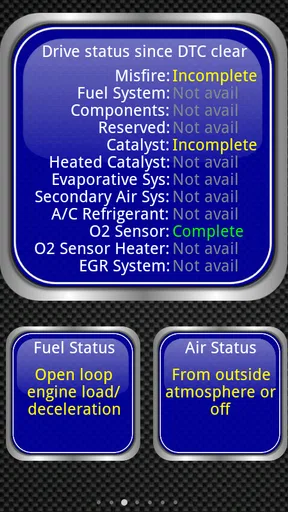
Our Review of Torque Pro (OBD 2 & Car)
 Analysis by Appyee
I usually reach for a car diagnostics app at a very ordinary moment: a warning light appears, a noise starts, or I simply want to know what the engine is doing beyond what the dashboard shows. Torque Pro (OBD 2 & Car) is built for that kind of curiosity, but it works best when you treat it as a tool for gathering clues rather than a mechanic that can settle every question. The app, developed by Ian Hawkins, has a 4.0 average from around 81,000 ratings, and its appeal is easy to understand: it puts live vehicle information and fault-code reading within reach of a driver who is willing to connect an OBD2 adapter.
Start with the car, not the dashboard
The first practical decision is whether your vehicle and adapter can provide the information you want. The app needs an OBD2 adapter connected to the car’s diagnostic port; the phone alone cannot read the vehicle. That extra piece of equipment is a real part of the experience, not a minor setup detail. If you already own a compatible adapter, the path is simpler. If not, you will need to choose one separately and make sure it suits your phone and vehicle before expecting a useful reading.
Torque Pro is a paid Communication app, listed at $4.95, with an Everyone age rating. It has been around since March 7, 2010, and its current version is 1.12.108, with Android 4.1 as the minimum operating-system requirement. More than 1 million installs suggest that it has found a steady audience among drivers who want more detail than a standard instrument panel offers. I would still check your phone’s compatibility and the adapter connection before a trip, rather than discovering a pairing problem beside the road.
Getting Started with Torque Pro
Diving into the world of car diagnostics can be intimidating, but Torque Pro makes it surprisingly straightforward. First off, you’ll need an OBD2 adapter, which connects to your car's diagnostic port. Once you've got that set up, pairing it with the app is a breeze. The app interface is intuitive, and even if you're not tech-savvy, you’ll find your way around without any fuss.
The real magic happens once you’re connected. The app gives you access to a wealth of information about your vehicle’s performance, from engine RPM to fuel efficiency and even fault codes. It's like having a window into your car's soul. And trust me, once you see all the data you can access, it’s hard not to geek out a little.
Features That Stand Out
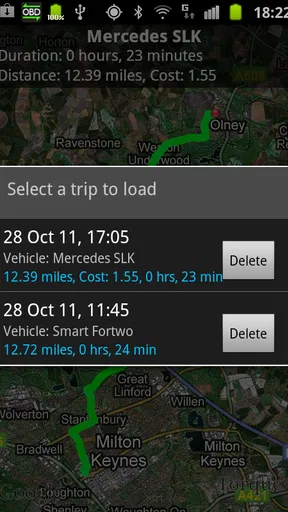
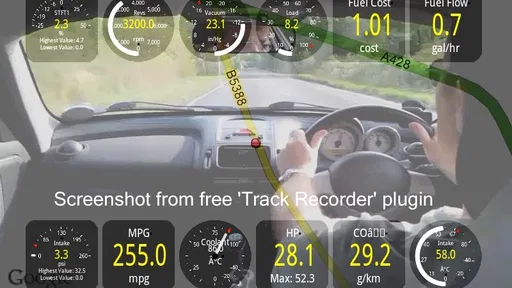
One of the coolest features is the real-time data logging. You can monitor your car's performance in real-time and even record the data for later analysis. This is particularly handy if you’re trying to diagnose a recurring issue or just want to keep track of your vehicle's performance over time.
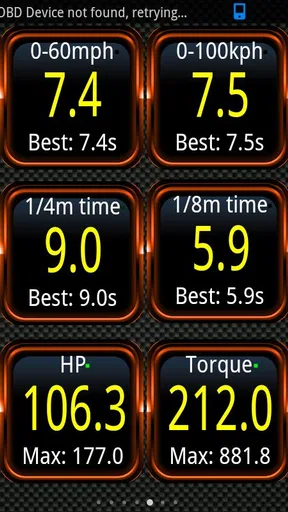
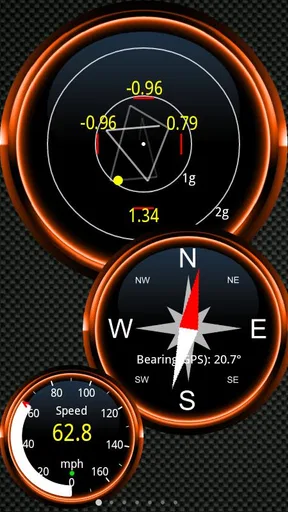
The customizable dashboard is another big win. You can set it up to display the information that's most important to you, whether that's speed, torque, or something else entirely. Plus, with the ability to create custom gauges, you can tailor the app to suit your specific needs.
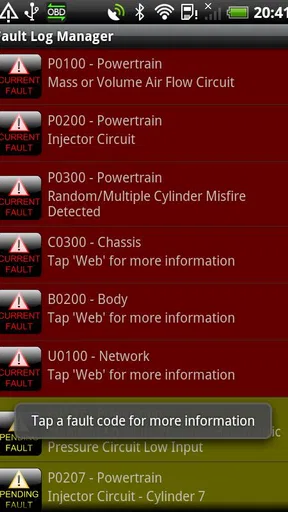
Another highlight is the fault code reader. And let me tell you, this feature alone can save you a ton of money and hassle. Instead of rushing to the mechanic every time your check engine light comes on, you can use the app to diagnose the problem yourself. It’s empowering to have that kind of knowledge at your fingertips.
Turn a warning light into a useful handoff
My preferred workflow is to pull over somewhere safe, connect to the adapter, read the fault information, and write down what the app reports before doing anything else. I then use that result as a starting point for research or as a clearer explanation when speaking with a repair shop. A code can narrow the area of concern, but it is not a complete diagnosis: the same symptom can have different causes, and a reading does not replace inspection or professional judgement.
This distinction matters most when the car feels or sounds different. If a warning appears alongside rough running, unusual heat, or a change in braking or steering, I would not use a phone reading as permission to keep driving. The useful handoff is the code and the conditions around it—when it appeared, what the car was doing, and whether it returned—not a confident guess about which part to replace.
Make the data answer one question
With live readings and logging available, it is tempting to put every gauge on the screen. I get more value by starting with one question: does the symptom happen at idle, under acceleration, or only after the engine warms up? A small dashboard focused on the relevant readings is easier to watch and makes a recorded drive less cluttered. For a recurring problem, keeping notes about the route and circumstances alongside the log can make later comparisons more meaningful than collecting a long, unexplained data stream.
The same restraint helps with performance figures. The app’s store summary points to BHP, torque, and 0–60 measurements, but those numbers are only useful when the setup and conditions make the comparison fair. I would treat them as a way to explore how a car behaves, not as laboratory-grade results or a substitute for a controlled test. If the goal is simply to understand a warning light, there is little reason to build a performance dashboard first.
When an app is better than a basic reader—and when it is not
Compared with a basic code reader, Torque Pro’s strength is having live data, a configurable dashboard, and logging in the same phone-based workflow. A simple reader may be the better choice for someone who only wants to retrieve a code occasionally and would rather not manage an adapter or a screen full of readings. A mechanic’s diagnostic equipment is different again: it may support deeper checks and guided procedures that a general-purpose app cannot replace. I see this app as a useful middle ground for an informed owner, not a universal substitute for either option.
It is particularly appealing if you enjoy learning how your own car behaves, want to keep an eye on changing readings, or prefer to arrive at a repair conversation with a specific observation. It is less suited to someone who expects the app to identify a failed component automatically, explain every code in plain language, or repair the underlying fault. The data can help you ask better questions; it cannot guarantee that you have found the answer.
Everyday use is about preparation, not constant monitoring
Imagine the check-engine light comes on during your usual drive home, but the car still feels normal. Rather than trying to troubleshoot while moving, I would finish the drive only if it felt safe, park, connect the adapter, and read the fault information. I would save the result, note whether the light was steady or appeared with another symptom, and then decide whether to arrange a prompt inspection. If the car is behaving badly, I would skip the experiment and seek help instead. That small change in approach keeps the app useful without turning a dashboard warning into a risky roadside project.
There is also a practical question about what to keep on screen. For a quick check, I would choose only the readings tied to the reason I opened the app. For a longer observation, I would record a focused set of data and compare it later under similar driving conditions. That is a more realistic use of logging than expecting a single drive to reveal a definitive trend, especially when route, traffic, and engine temperature can all affect what you see.
Under the Hood: Performance and Usability
In terms of performance, Torque Pro is rock solid. During my tests, the app was quick to connect and the data refresh rate was impressive. There was no noticeable lag, and everything ran smoothly. As for usability, the app is well-designed with a clean, user-friendly interface. It's clear that a lot of thought has gone into making the app accessible to both novices and seasoned car enthusiasts.
One thing worth mentioning is that while the app is packed with features, it doesn’t overwhelm you with information. You have the flexibility to delve deep into the technical details or just stick to the basics, depending on your comfort level and needs.
Where the workflow can break
The adapter is the first possible snag: a loose connection, an incompatible device, or a phone that does not pair as expected can stop the process before any car data appears. Even after connecting, the vehicle determines which readings are available, so I would not assume every gauge will be meaningful on every car. When a value looks implausible, I would check the connection and the selected reading before treating it as evidence of a mechanical problem.
There is a learning curve in deciding what to do with a code, too. Clearing a fault can make the warning disappear temporarily without fixing its cause, and it may remove information that would help a technician understand what happened. I would record the code first and avoid clearing it just to make the dashboard look normal. The app can make the first step easier, but the owner still has to decide when a professional inspection is the safer next step.
Why Torque Pro is a Must-Have
In a world where car repairs can be costly and time-consuming, having an app like Torque Pro is invaluable. It gives you control over your vehicle's maintenance and can potentially save you from unnecessary trips to the mechanic. Plus, it's a fantastic learning tool. The more you use it, the more you learn about how your car operates.
If you’re someone who likes to take a hands-on approach to car maintenance, this app is a no-brainer. Even if you're not, the peace of mind it offers in terms of understanding what's going on with your vehicle is worth the investment.
Overall, Torque Pro (OBD 2 & Car) is more than just an app; it's a comprehensive tool that transforms how you interact with your car. Whether you're a seasoned mechanic or a curious car owner, this app is bound to become a trusted companion on your automotive journey.
My final take after following the whole process
I recommend it to drivers who are comfortable pairing an adapter, curious about engine information, and willing to treat readings as evidence rather than instructions. Its combination of fault-code access, live information, and logging makes it more flexible than a bare-bones code reader, while remaining approachable enough for a careful owner to explore. The value is strongest when you use it to observe, record, and communicate—not when you expect it to make repair decisions for you.
If you want a one-tap diagnosis or do not want to buy and manage an adapter, this is probably not the right fit. If you like understanding what your car is reporting and can accept that some situations still call for a technician, the $4.95 price is a straightforward entry point into that process. I would keep the app as a companion for informed checks, with safety and professional diagnosis taking priority whenever the car’s behavior gives me reason to worry.
Verdict
Strengths of Torque Pro (OBD 2 & Car)
- Real-time car performance data.
- Supports a wide range of vehicles.
- Customizable dashboard and widgets.
- Easy to connect with OBD2 adapter.
- Regular updates and feature improvements.
Limitations of Torque Pro (OBD 2 & Car)
- Can drain battery quickly.
- Requires a separate OBD2 adapter.
- Interface may feel cluttered.
- Some features need technical knowledge.
- Occasional connectivity issues.
Other Releases by Ian Hawkins
View All
Widgets for Torque (OBD / Car)
Maps & Navigation3.0
Similar Picks in This Category
View All
Google Messages
Google LLC4.6

Gmail
Google LLC4.1

Google Meet
Google LLC4.4

Google Chrome
Google LLC4.1

WhatsApp Messenger
WhatsApp LLC4.6

Carrier Services
Google LLC4.2
Frequently Asked Questions
What is Torque Pro, and how does it work?
Torque Pro (OBD 2 & Car) is a powerful diagnostic tool that connects to your vehicle's onboard computer via an OBD-II adapter. It provides real-time data about your vehicle's performance, including engine diagnostics, fuel consumption, and sensor readings. This app is especially beneficial for car enthusiasts and mechanics who need detailed insights into vehicle operations.
What devices are compatible with Torque Pro?
Torque Pro is compatible with Android devices. To use it, you'll need an OBD-II adapter, which connects to your vehicle's diagnostic port. Most Bluetooth or Wi-Fi OBD-II adapters work well with the app. Before purchasing, ensure that your smartphone or tablet meets the app's system requirements for optimal performance.
Do I need technical knowledge to use Torque Pro effectively?
While Torque Pro offers advanced features, you don't need extensive technical expertise to use it. The app has a user-friendly interface with clear displays and graphs. However, basic knowledge of vehicle operations and diagnostics will help you interpret the data more effectively and make the most of its capabilities.
What are the key features of Torque Pro?
Torque Pro offers a variety of features, including real-time data monitoring, fault code reading, and engine performance tracking. It also provides custom dashboards, GPS speedometer integration, and the ability to track fuel economy. These features make it an invaluable tool for both casual users and professional mechanics.
Is Torque Pro a one-time purchase or a subscription service?
Torque Pro is a one-time purchase app. Once you buy it from the Google Play Store, you can use it indefinitely without any recurring subscription fees. This makes it a cost-effective option for those seeking comprehensive vehicle diagnostics without ongoing costs.
